EByte and Binary Schemas Explained in Plain Language
A text file explains itself. Open a CSV or a JSON file and you can read it, more or less. A binary file doesn’t. Open one in a hex editor and you see rows of numbers like 45 42 01 02 01 41 00, and nothing tells you where one value stops and the next begins.
That’s because the meaning lives outside the file. Some program decided that the first two bytes are a magic number, the next byte is a version, the one after that counts how many records follow, and so on. The program knows. The file doesn’t. If you want to read that file in another program, you need a copy of that knowledge.
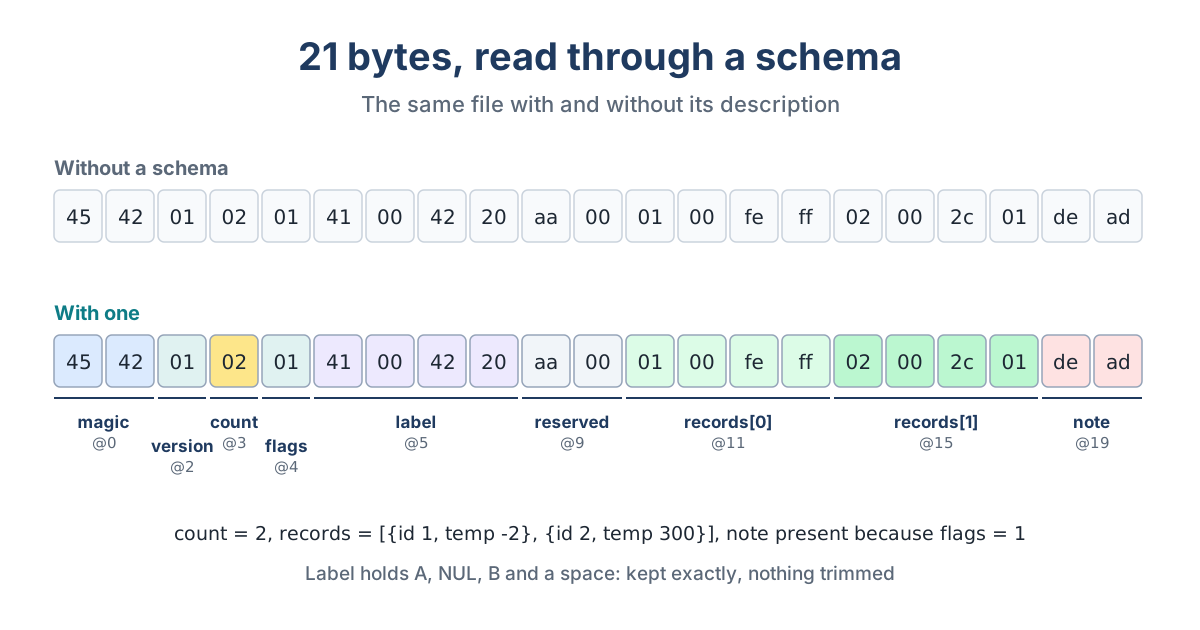
A Schema Is That Knowledge, Written Down
A binary schema is a description of the layout, kept apart from any one program. EByte’s schemas are JSON. Each field has a name, a type and a width, in the order they appear. Integers say how many bytes they take and which byte order they use. Strings and byte fields say how long they are, either as a fixed number or by pointing at an earlier field that holds the length. Arrays say how many elements they have, the same way.
Once that’s written down, the picture above stops being a row of numbers. Bytes 0 and 1 are the magic number 4542. Byte 3 says there are 2 records. Bytes 5 to 8 are a four-character label holding an A, a NUL, a B and a space. The two records take 4 bytes each. The note at the end is there only because the flags byte equals 1.
Why One Description Beats Three
Most projects that touch a binary format end up describing it several times. The reader is one description, written as code. The writer is another, and it has to stay in step with the reader to the byte. The template someone made in a hex editor while debugging is a third. When the format changes, all three have to change together, and in practice one gets missed.
EByte uses the same schema for all three jobs. Reading turns the bytes into a JSON document. Writing turns the document back into bytes. Inspecting walks the file and reports each field’s offset and length, which is what you’d otherwise be counting by hand in the hex editor. Because it’s the same interpreter every time, the reader and the writer don’t each carry their own copy of the format to drift apart.
The Round Trip Test
The simplest way to tell whether a format description is complete is to read a file and write it straight back. If anything differs, something was lost: a reserved byte the reader skipped, a string the writer padded differently, a count it recalculated wrongly. EByte treats that test as a rule. Decode a file, encode the result unchanged, and every byte has to come back. To make that possible, a schema has to declare everything, padding and reserved bytes included, and EByte won’t trim, pad or normalize anything on its own.
Where EByte Sits Among Other Tools
Binary formats have been described declaratively for a long time. Kaitai Struct describes formats in YAML and generates parser code for many programming languages. Hex editors such as ImHex and 010 Editor have template languages for looking inside files. Network tools have dissectors for protocols. These are mature tools with large format libraries, and EByte doesn’t replace them.
EByte’s angle is narrower. It interprets the schema at run time, so there’s no generated code to keep in sync. Writing a file is as much a part of it as reading one. And its errors are built for scripts as well as people: one JSON line naming the field and the byte, with an exit code that says what kind of failure it was. It’s also deliberately limited. Version 1 has no floating point, no bit fields, no seeking and no arithmetic between fields, and every size has a hard ceiling.
If you’d like to see it on a real format, the WAV case study reads and edits an audio file header. The schema reference lists everything a schema can say.