EByte Case Study Flipping and Editing a Real BMP Image
BMP is about as plain as image formats get, which makes it a good test of whether a schema can describe a real file down to the last byte. This case study made a tiny bitmap with Python’s Pillow library, read it with the released ebyte 0.1.1 binary, edited it four ways and broke it five ways. Every number below is what the tools printed.
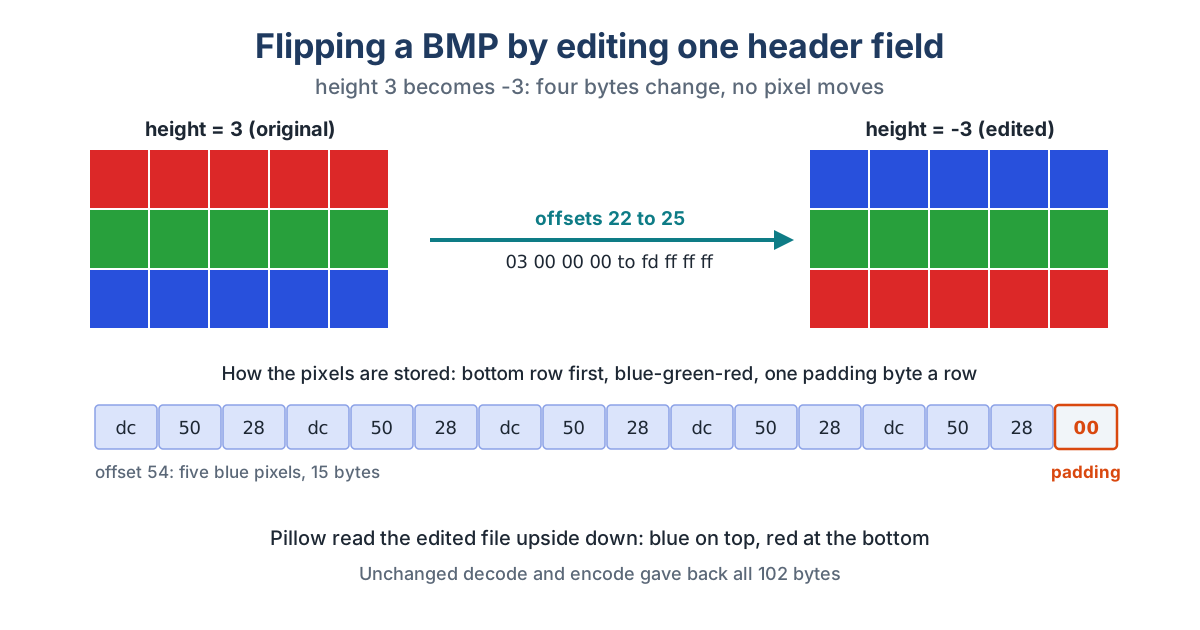
The image is 5 pixels wide and 3 tall: a red stripe on top, green in the middle, blue at the bottom. Pillow saved it as a 102-byte, 24-bit BMP. That’s a 14-byte file header, a 40-byte info header and 48 bytes of pixels. Five pixels at 3 bytes each make 15 bytes a row, and BMP pads every row to a multiple of 4, so each row carries one extra zero byte.
The Schema
Sixteen fields cover the whole file. The fixed values become checks, so the schema only accepts what it can actually describe: the BM signature, a 40-byte info header, 24 bits per pixel and no compression. The pixels are one byte field whose length comes from the header’s image_size:
{
  "schema_version": 1,
  "name": "bmp_24bit",
  "endian": "little",
  "fields": [
    {"name": "signature", "type": "bytes", "length": 2, "expect": "424d"},
    {"name": "file_size", "type": "u32"},
    {"name": "reserved", "type": "bytes", "length": 4},
    {"name": "pixel_offset", "type": "u32", "expect": "54"},
    {"name": "header_size", "type": "u32", "expect": "40"},
    {"name": "width", "type": "i32"},
    {"name": "height", "type": "i32"},
    {"name": "planes", "type": "u16", "expect": "1"},
    {"name": "bits_per_pixel", "type": "u16", "expect": "24"},
    {"name": "compression", "type": "u32", "expect": "0"},
    {"name": "image_size", "type": "u32"},
    {"name": "x_pixels_per_meter", "type": "i32"},
    {"name": "y_pixels_per_meter", "type": "i32"},
    {"name": "colors_used", "type": "u32"},
    {"name": "colors_important", "type": "u32"},
    {"name": "pixels", "type": "bytes", "length": {"field": "image_size"}}
  ]
}
ebyte inspect agreed with Pillow on everything: width 5 at offset 18, height 3 at offset 22, image_size 48, 3,780 pixels per meter (96 DPI) and the pixel data starting at offset 54.
Round Trip
decode turned the 102 bytes into a 515-byte JSON document. The pixels come out as hex, and they’re a little surprising if you haven’t looked inside a BMP before. The first bytes are dc5028, which is the blue stripe. BMP stores the bottom row first, and each pixel as blue, green, red. Each row ends in 00, the padding byte. EByte keeps all of it exactly as stored, so encode on the unchanged document gave back a file with the same SHA-256 as the original.
Four Edits
Each edit was one change in the JSON, then encode to a new file and a byte-by-byte comparison with the original.
| Edit in the JSON | Bytes changed | What Pillow saw |
|---|---|---|
height from "3" to "-3" |
4, at offsets 22 to 25 | The image upside down: blue on top, red at the bottom |
Both pixels-per-meter fields to "11811" |
4, at offsets 38, 39, 42 and 43 | 300 DPI instead of 96 |
First 6 hex characters of pixels to ffffff |
3, at offsets 54 to 56 | Bottom-left pixel white |
| Nothing | 0 | The original image |
A negative height tells BMP readers the rows are stored top to bottom, so flipping the sign flips the picture without touching a single pixel.
Five Failures
| What was done | What EByte said | Exit |
|---|---|---|
| A PNG of the same image passed in | constraint_mismatch at /signature, offset 0 |
2 |
| The image saved as a 32-bit BMP with transparency | constraint_mismatch at /bits_per_pixel, offset 28 |
2 |
| The file cut at 80 bytes | truncated_input at /pixels, offset 80, field started at 54, expected 48 bytes, saw 26 |
2 |
| One pixel byte deleted from the JSON | value_out_of_range at /pixels |
2 |
| The pixel hex typed in capitals | invalid_document at /pixels |
2 |
The 32-bit file is the useful one. ebyte inspect on it printed the trace up to the failure, and the failed line still showed the value it found, value=32. So one line tells you which field objected, where it sits in the file and what it holds.
What It Showed
A 24-bit BMP fits EByte’s version 1 completely, padding included, because the padding lives inside the pixel bytes and comes back untouched. Edits that change a header value are one-line changes in JSON. What EByte won’t do is keep related fields in step for you. Change width and you’d also have to fix image_size, file_size and every row’s padding by hand, since version 1 has no arithmetic between fields. The schema also rejects other BMP variants on purpose, such as 32-bit, paletted or compressed files. Each of those would need its own schema.
The commands are in the quick start, and the WAV case study does the same with an audio file.